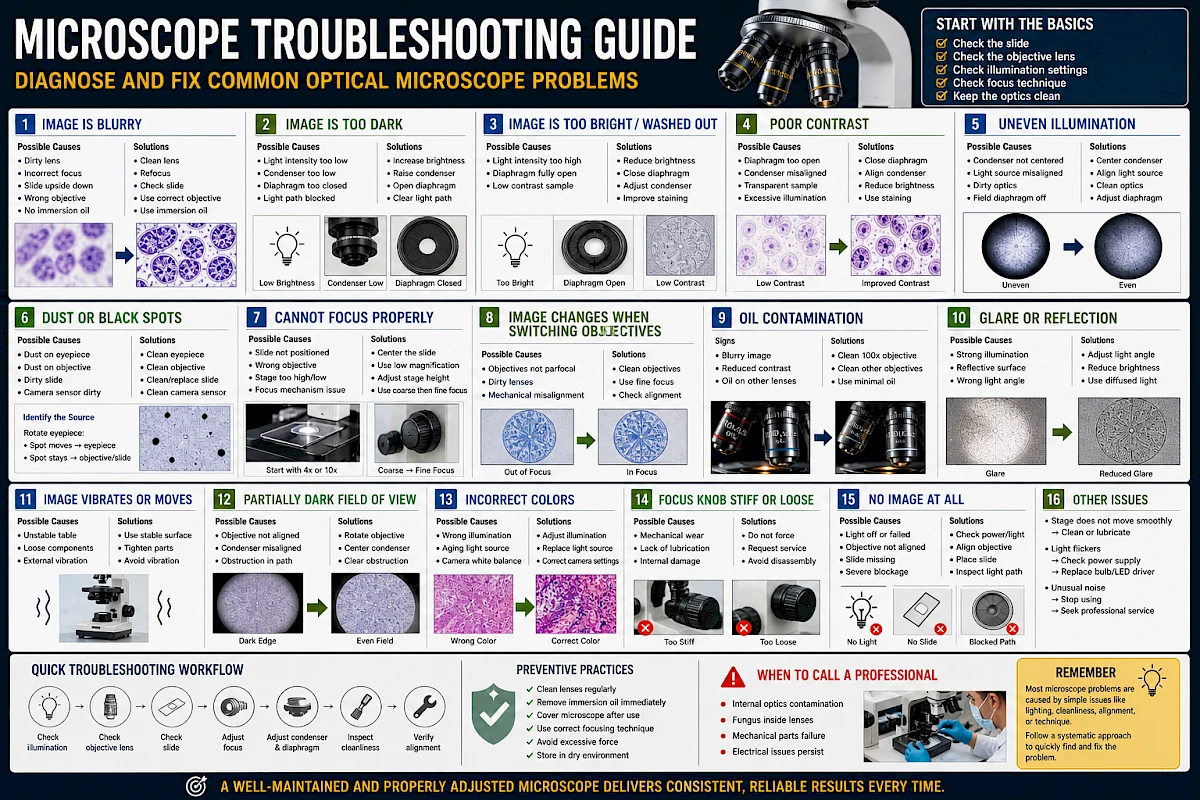
Microscope Troubleshooting Guide: Diagnose and Fix Common Optical Microscope Problems
Even a high-quality microscope can produce poor results if something is misconfigured, dirty, or worn. In practice, most microscope issues are not caused by defects—but by setup, handling, or maintenance problems.
This guide provides a systematic approach to diagnosing and fixing the most common optical microscope problems.
1. Start with a Simple Rule: Check Before You Assume
Before assuming the microscope is faulty:
- Check the slide
- Check the objective lens
- Check illumination settings
- Check focus technique
In most cases, the issue can be resolved in seconds with a simple adjustment.
2. Problem: Image Is Blurry
Possible Causes
- Dirty objective lens
- Dirty eyepiece
- Incorrect focus
- Slide upside down
- Cover glass too thick or missing
- Using wrong objective (e.g., oil lens without oil)
Solutions
- Clean objective and eyepiece with lens paper
- Refocus using fine adjustment
- Ensure slide is correctly oriented
- Use proper cover glass (typically 0.17 mm)
- Apply immersion oil when using 100× objective
3. Problem: Image Is Too Dark
Possible Causes
- Light intensity too low
- Condenser positioned too low
- Iris diaphragm too closed
- Objective not fully clicked into position
- Light path partially blocked
Solutions
- Increase brightness gradually
- Raise the condenser
- Open the diaphragm slightly
- Rotate objective until it clicks into place
- Check for obstructions in the light path
4. Problem: Image Is Too Bright / Washed Out
Possible Causes
- Light intensity too high
- Iris diaphragm fully open
- Low contrast sample
Solutions
- Reduce light intensity
- Partially close the diaphragm
- Adjust condenser height
- Improve sample preparation or staining
5. Problem: Poor Contrast
Possible Causes
- Diaphragm too open
- Condenser misaligned
- Sample is transparent or unstained
- Excessive illumination
Solutions
- Close diaphragm slightly
- Adjust condenser position
- Reduce brightness
- Use staining or contrast techniques
6. Problem: Uneven Illumination
Possible Causes
- Condenser not centered
- Light source misaligned
- Dirty optics
- Field diaphragm misadjusted (if present)
Solutions
- Center the condenser
- Check alignment of light source
- Clean optical components
- Adjust illumination system properly
7. Problem: Black Spots or Dust in Image
Possible Causes
- Dust on eyepiece
- Dust on objective lens
- Dirt on slide
- Camera sensor contamination
How to Identify the Source
- Rotate the eyepiece:
- If the spot moves → eyepiece is dirty
- If it stays → check objective or slide
Solutions
- Clean eyepiece and objective
- Replace or clean slide
- Clean camera sensor if applicable
8. Problem: Cannot Focus Properly
Possible Causes
- Slide not positioned correctly
- Wrong objective selected
- Stage too high or too low
- Mechanical focus issue
Solutions
- Start with lowest magnification (4× or 10×)
- Reposition slide and center sample
- Adjust stage height slowly
- Use coarse focus first, then fine focus
9. Problem: Image Changes When Switching Objectives
Possible Causes
- Objectives not parfocal
- Dirty lenses
- Mechanical misalignment
Solutions
- Clean all objectives
- Use fine focus after switching
- Check if objectives are properly installed
10. Problem: Oil Contamination
Signs
- Blurry or hazy image
- Reduced contrast
- Oil visible on other objectives
Causes
- Excess immersion oil
- Switching objectives without cleaning
Solutions
- Clean 100× objective immediately after use
- Check nearby objectives (especially 40×)
- Use minimal oil in future
11. Problem: Glare or Reflection
Common in Industrial Use
Possible Causes
- Strong direct illumination
- Reflective sample surface
- Incorrect lighting angle
Solutions
- Adjust light angle
- Reduce brightness
- Use diffused lighting if available
12. Problem: Image Vibrates or Moves
Possible Causes
- Unstable table
- Loose components
- External vibration
Solutions
- Place microscope on stable surface
- Tighten loose parts
- Avoid high-vibration environments
13. Problem: Field of View Is Partially Dark
Possible Causes
- Objective not aligned properly
- Condenser misalignment
- Obstruction in optical path
Solutions
- Rotate objective until it clicks
- Re-center condenser
- Check for dirt or blockage
14. Problem: Colors Look Incorrect
Possible Causes
- Incorrect illumination settings
- Aging light source (especially halogen)
- Camera white balance issues
Solutions
- Adjust light intensity and temperature
- Replace light source if needed
- Correct camera settings
15. Problem: Focus Knob Feels Stiff or Loose
Possible Causes
- Mechanical wear
- Lack of lubrication
- Internal damage
Solutions
- Do not force movement
- Request professional servicing
- Avoid disassembly without expertise
16. Problem: No Image at All
Possible Causes
- Light source off or failed
- Objective not aligned
- Slide missing or misplaced
- Severe optical blockage
Solutions
- Check power and illumination
- Ensure objective is in position
- Confirm slide placement
- Inspect optical path
17. Quick Troubleshooting Workflow
When facing any issue, follow this order:
- Check illumination
- Check objective lens
- Check slide condition
- Adjust focus
- Adjust condenser and diaphragm
- Inspect cleanliness
- Verify mechanical alignment
This sequence solves most problems efficiently.
18. Preventive Practices
Most troubleshooting can be avoided with good habits:
- Clean lenses regularly
- Remove immersion oil immediately
- Cover microscope after use
- Use correct focusing technique
- Avoid excessive force
- Store in dry environment
Prevention is always easier than repair.
19. When to Call a Professional
Seek expert service if:
- Internal optics are contaminated
- Fungus is present inside lenses
- Mechanical parts fail
- Electrical issues persist
Do not attempt complex repairs without proper training.
Conclusion
Microscope problems are often simple to fix once you understand the system. Most issues come down to lighting, cleanliness, alignment, or technique.
By following a structured troubleshooting approach, you can quickly identify the cause and restore optimal performance.
A well-maintained and properly adjusted microscope delivers consistent, reliable results every time.